E7 Builder:エピックセブンの装備ビルダー
E7 Builder は、エピックセブンの装備と英雄をゲームから取り込んで一覧にし、英雄ごとにいちばん良い装備の組み合わせを探せる、無料の非公式ファンツールです。何百個もある装備の中から、セット・メインステータス・目標のステータスに合う組み合わせを、ブラウザの中で数百万通り調べて見つけます。
ログインすると、取り込んだデータがサーバーに保存され、PC とスマートフォンで同じデータを使えます。取り込みは Windows の PC で行います。
できること
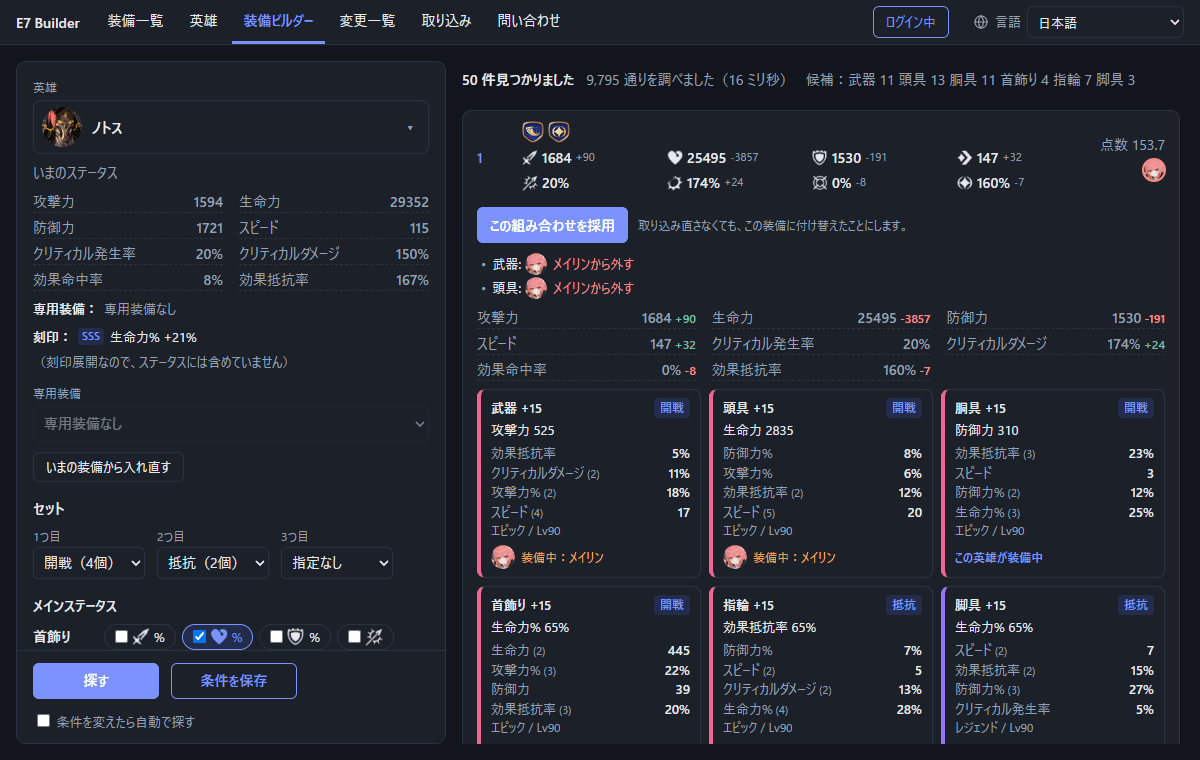
装備一覧
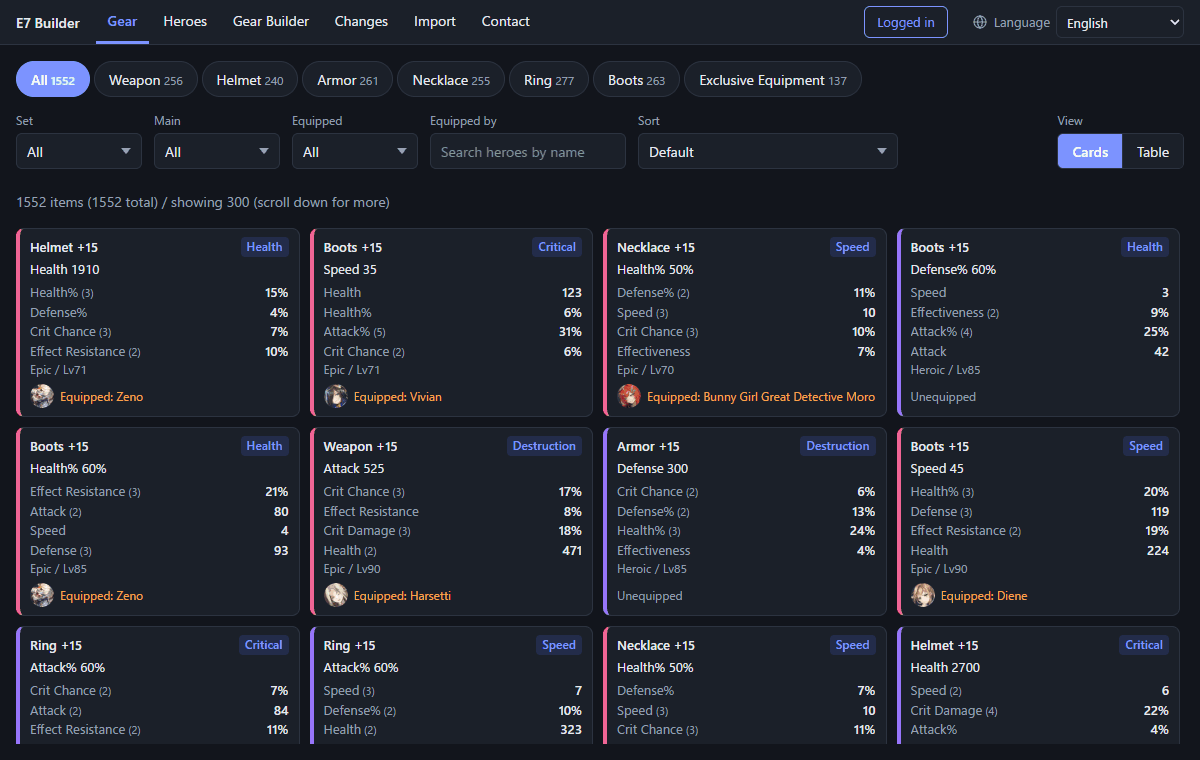
持っている装備を部位・セット・メインステータス・装備している英雄で絞り込み、サブステータスの値や強化の回数で並べ替えられます。カードと表の2つの見せ方があります。
英雄
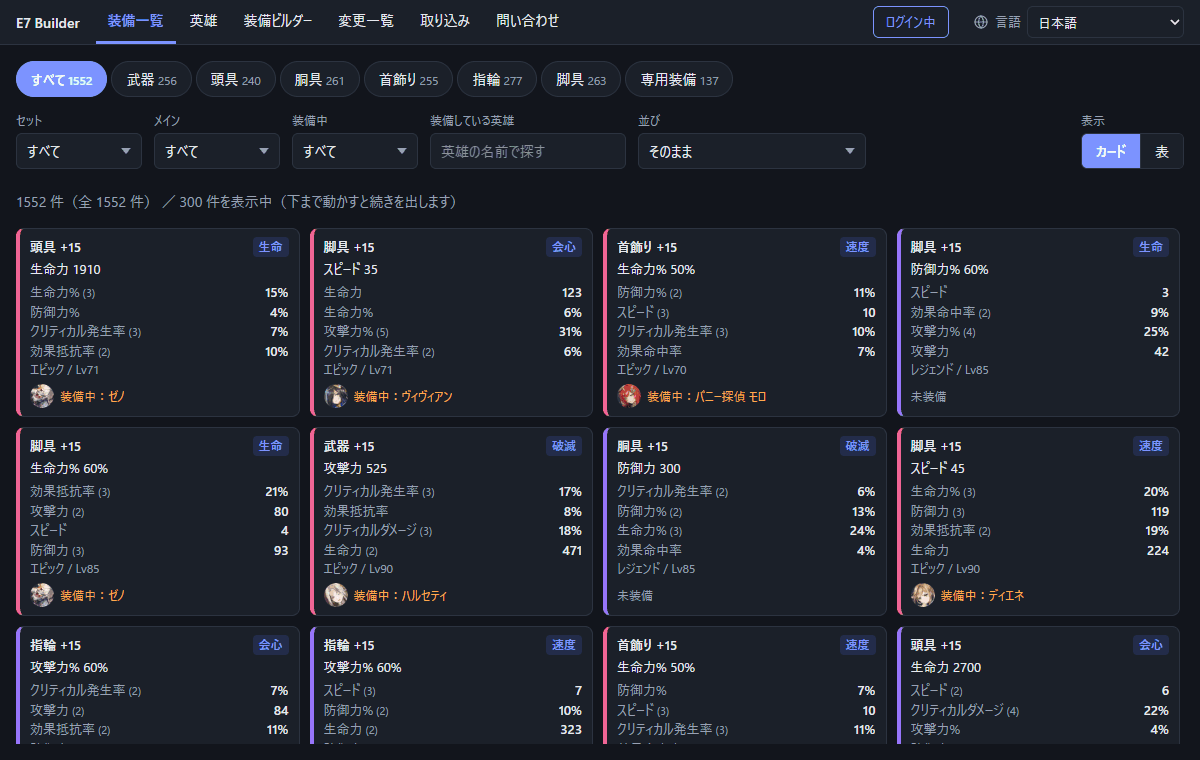
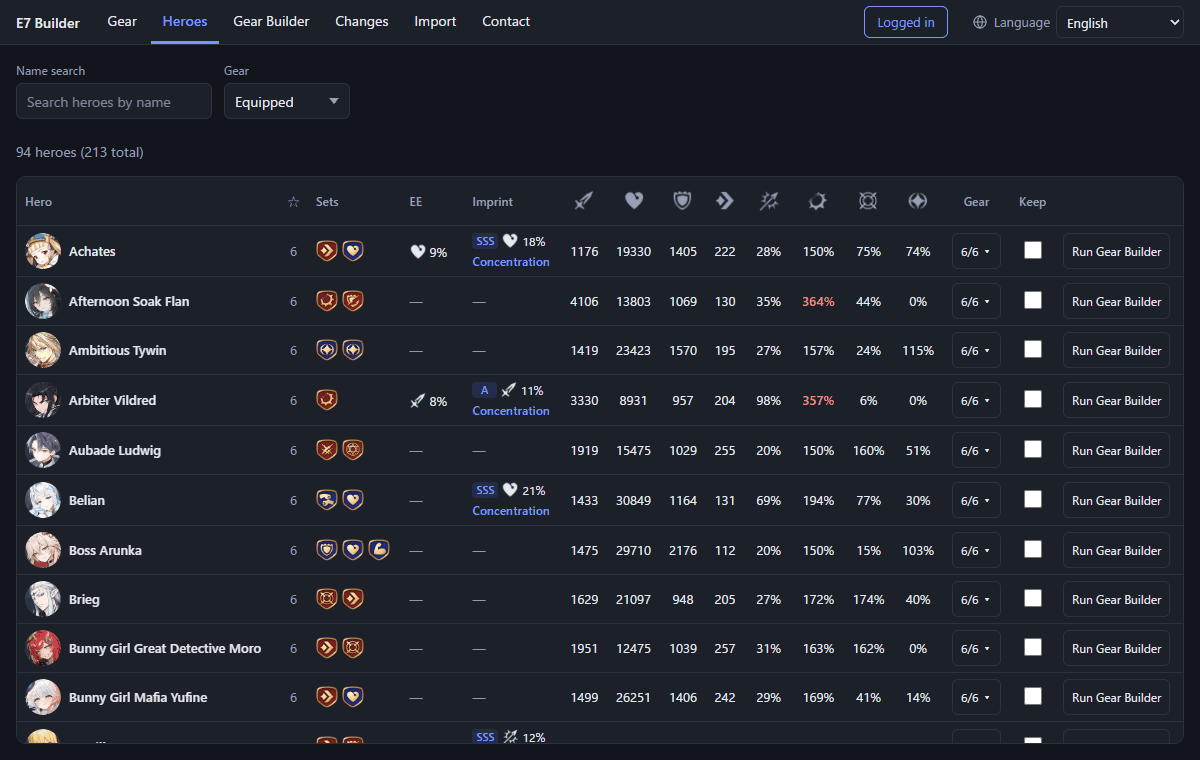
英雄ごとに、いま着けている装備・セット・専用装備・刻印と、それらを合わせた最終のステータスを一覧で比べられます。クリティカル発生率 100% などの上限を超えた値は赤く出ます。
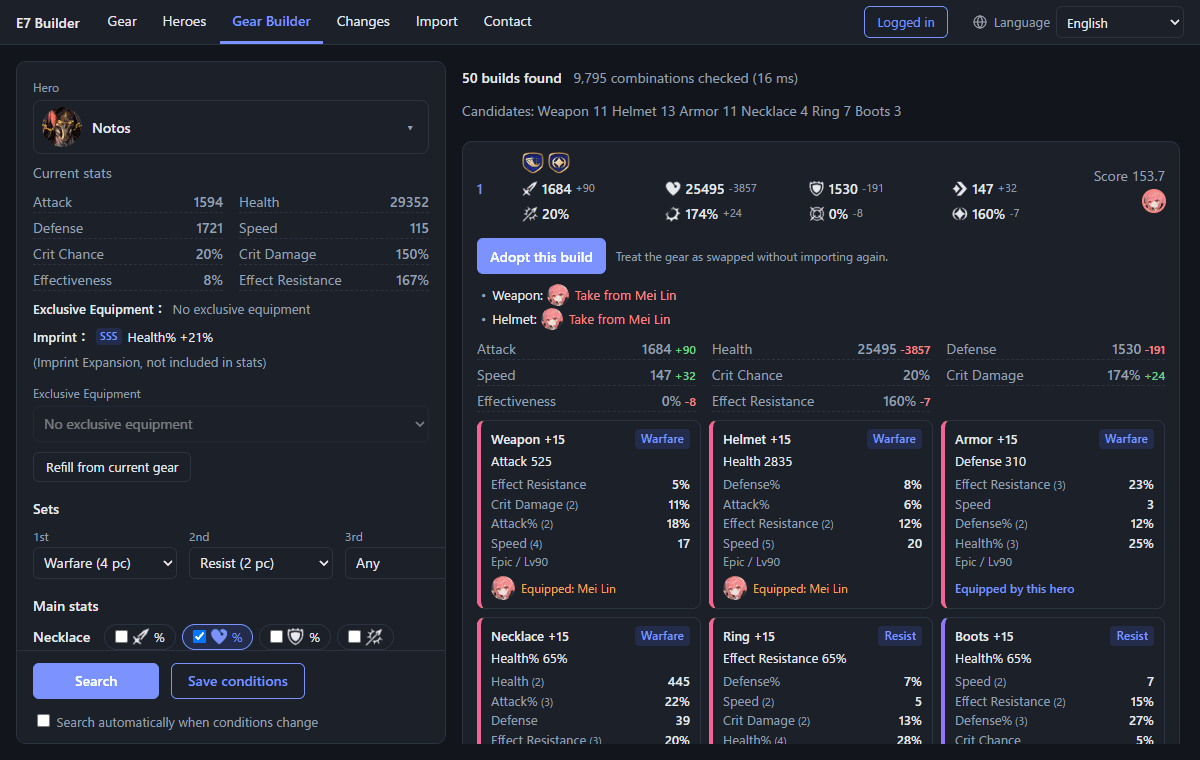
装備ビルダー
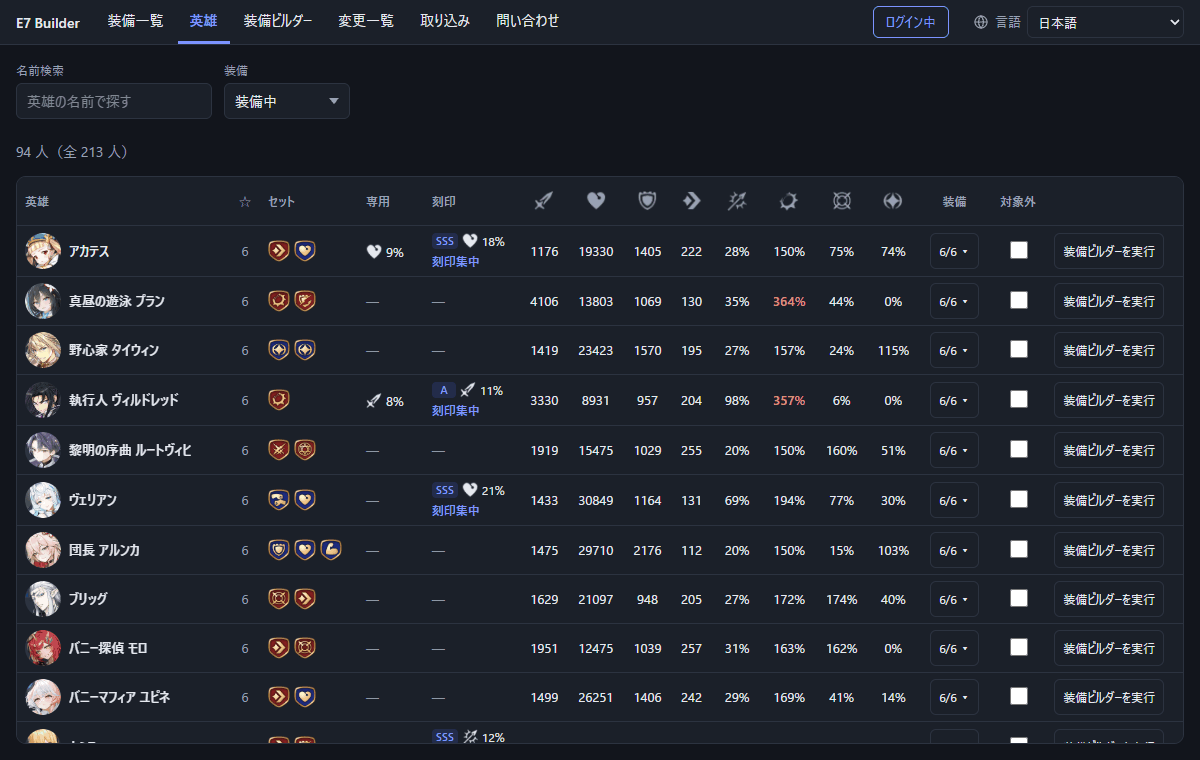
セット、首飾り・指輪・脚具のメインステータス、ステータスの下限・上限・重要度を決めると、条件に合う組み合わせを点数の高い順に50件出します。見つからないときは、どの条件が届かないのかも教えます。
変更一覧
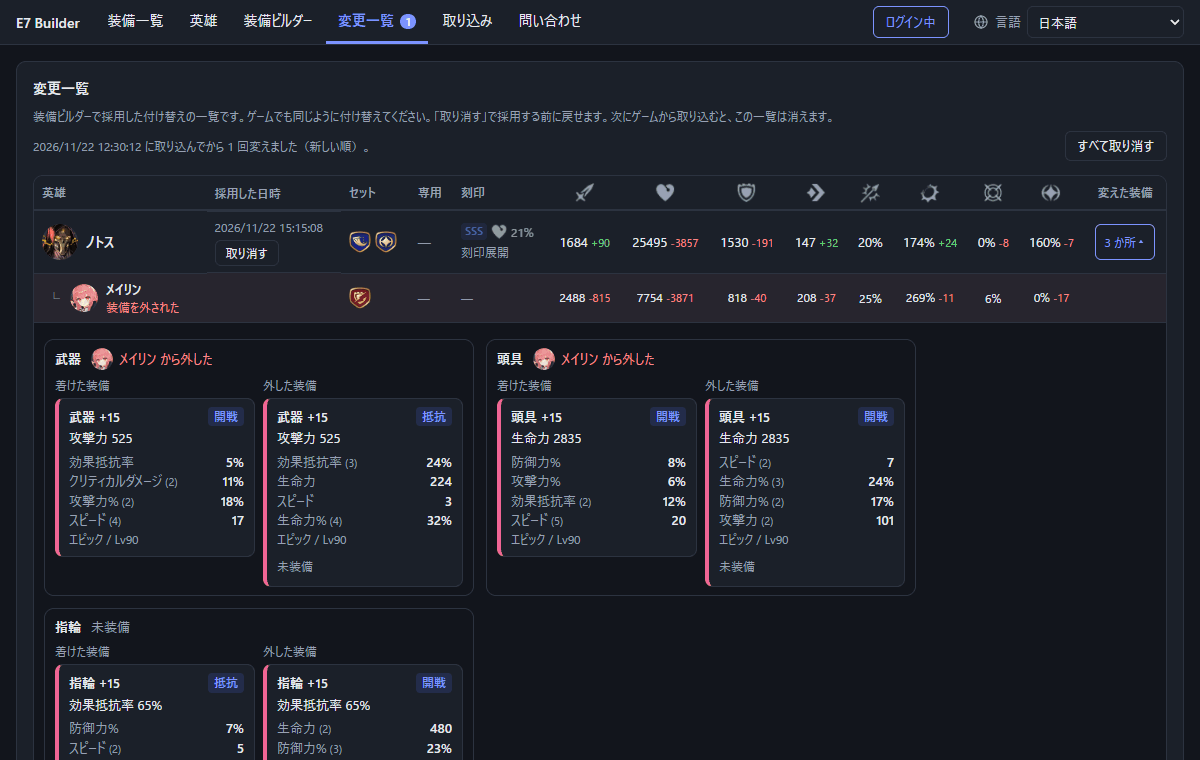
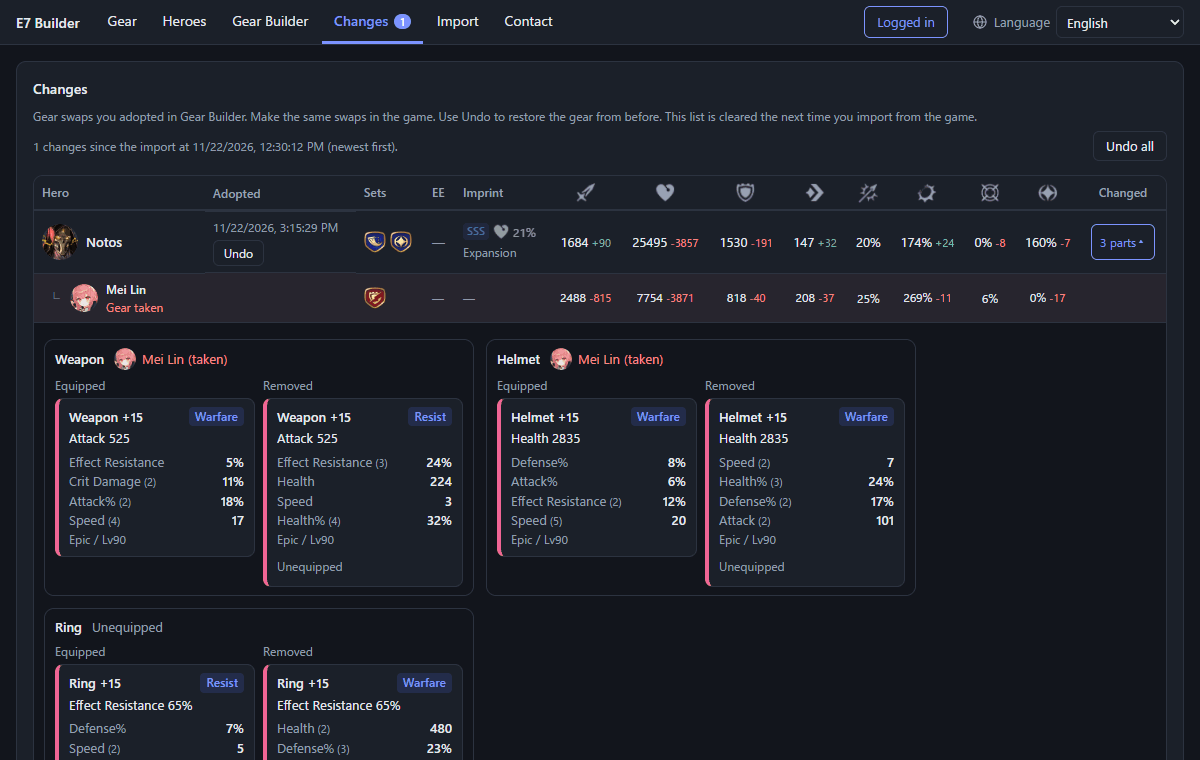
装備ビルダーの結果を「採用」すると、取り込み直さなくても付け替えたことにでき、誰から装備を外したか・ステータスがどう変わったかを一覧で確かめられます。取り消しもできます。
使い方
- ログインする:Google アカウント、またはメールアドレスとパスワードでログインします(ログインしなくても、その PC だけで使えます)。
- 取り込みツールを用意する:Windows の PC に Npcap を入れ、「取り込み」画面から取り込みツール(E7BuilderCapture.exe)をダウンロードして起動します。
- ゲームから取り込む:「確認を始める」を押し、PC のエミュレーターでゲームを起動し直してロビーまで進め、「終わって取り込む」を押します。
- 装備ビルダーで探す:英雄を選ぶと、いまの装備の内容が条件に入ります。条件を変えると、自動で組み合わせを探し直します。
- 採用してゲームで付け替える:気に入った組み合わせを採用し、「変更一覧」を見ながらゲームでも同じように付け替えます。
よくある質問
無料ですか?
無料です。運営のため、ページに広告を表示します。
スマートフォンだけで使えますか?
取り込みは Windows の PC が必要です。PC で取り込んでログインしておけば、スマートフォンでも装備一覧・英雄・装備ビルダーを使えます。
ゲームのデータを書き換えますか?
書き換えません。取り込みツールは、PC の中でゲームの通信を読み取るだけです。ゲームのアカウント情報やパスワードは扱いません。取り込みツールの利用が問題ないかは、利用者自身で確認してください(利用規約)。
ステータスはゲームと同じになりますか?
装備・セット効果・専用装備・刻印(刻印集中のとき)を合わせて計算します。アーティファクトの効果は含みません。強化途中の装備のメインステータスは、+15 にしたときの値で計算します。
どこに問い合わせればいいですか?
ログインして「問い合わせ」画面から送るか、[email protected] にメールしてください。
関連するツール
E7 Builder: a gear builder for Epic Seven
E7 Builder is a free, unofficial fan tool that imports your Epic Seven gear and heroes from the game, lists them, and finds the best gear combination for each hero. It checks millions of combinations in your browser to find ones that match your sets, main stats and target stats.
Log in to save your imported data on our server and use it on both PC and phone. Importing is done on a Windows PC.
Features
Gear
Filter your gear by slot, set, main stat and the hero wearing it, and sort by substat values or rolls. Card and table views are available.
Heroes
Compare each hero's current gear, sets, Exclusive Equipment, imprint and final stats in one table. Values past their cap (such as 100% Critical Hit Chance) are shown in red.
Gear Builder
Set the sets, the main stats of necklace, ring and boots, and minimum, maximum and priority of each stat to get the top 50 combinations. If nothing is found, it tells you which condition cannot be reached.
Changes
Adopt a Gear Builder result to treat the gear as swapped without importing again, and see whose gear was taken and how the stats changed. You can undo it.
How to use
- Log in with Google or email and password (without logging in, data stays on that PC only).
- Prepare the capture tool: install Npcap on a Windows PC, then download and start the capture tool (E7BuilderCapture.exe) from the Import tab.
- Import from the game: press Start recording, restart the game in your PC emulator and go to the lobby, then press Finish and import.
- Search in Gear Builder: picking a hero fills in the current gear as conditions. Changing conditions searches again automatically.
- Adopt and swap in the game: adopt a combination you like and make the same swaps in the game while checking the Changes tab.
FAQ
Is it free?
Yes. Ads are shown on the pages to support running the service.
Can I use it with only a phone?
Importing needs a Windows PC. After importing on a PC while logged in, you can use Gear, Heroes and Gear Builder on your phone.
Does it modify game data?
No. The capture tool only reads the game traffic on your PC. It never handles your game account or password. Please check yourself whether using the capture tool is acceptable (Terms).
Are the stats the same as in the game?
They include gear, set effects, Exclusive Equipment and imprint (when set to Imprint Concentration). Artifacts are not included. The main stat of gear below +15 is calculated at its +15 value.
How do I contact you?
Log in and use the Contact tab, or email [email protected].
Related tools
E7 Atlas also offers RTA7PICKS, which helps with picks and bans in World Arena (RTA).